Wednesday, September 29, 2010

DHCPD On Multiple Interface

I have eth0 192.168.0.1 and eth2 192.168.98.1 and here is my simplified dhcpd.conf:

# dhcpd.conf

#
# Configuration file for ISC dhcpd (see 'man dhcpd.conf')
#
default-lease-time 2400;
max-lease-time 7200;
option domain-name "mydomain.com";
ddns-update-style none;

subnet 192.168.0.0 netmask 255.255.255.0 {

option subnet-mask 255.255.255.0;
option broadcast-address 192.168.0.255;
option routers 192.168.0.1;
range 192.168.0.51 192.168.0.249;
}

subnet 192.168.98.0 netmask 255.255.255.0 {

option subnet-mask 255.255.255.0;
option broadcast-address 192.168.98.255;
option routers 192.168.98.1;
range 192.168.98.51 192.168.98.249;
}

and DHCP starts in my startup script:


Code:
/usr/sbin/dhcpd eth0 eth2 

Vlan on Debian : Another Tutorial

Here is a quick guide how to enable VLANs on Ubuntu or Debian box.

VLANs on Linux will work with the most of the modern ethernet adapters. Frankly speaking I have not came across of adapter it would not work with.

I presume that you use standard kernel shipped with Ubuntu. However, if you use a custom built kernel make sure VLAN support is enabled in it.

In this example I want my computer to connect to vlan4,vlan5 and vlan101. My default gateway is in vlan101. And I have only one ethernet interface eth0. 

Note: If you want to connect to only one VLAN or you have many network interfaces it is possible to do as well.

OK, now how to do this:

1. Install VLAN package on your computer:
sudo apt-get install vlan
2. Edit your /etc/network/interfaces file so it would contain the following:

# The loopback network interface
auto lo
iface lo inet loopback


# This is a list of hotpluggable network interfaces.
# They will be activated automatically by the hotplug subsystem.
auto vlan4
auto vlan5
auto vlan101


# VLAN 4
iface vlan4 inet static
address 192.168.0.8
netmask 255.255.255.192
network 192.168.0.0
broadcast 192.168.0.63
mtu 1500
vlan_raw_device eth0


# VLAN 5
iface vlan5 inet static
address 10.0.111.8
netmask 255.255.255.0
network 10.0.111.0
broadcast 10.0.111.255
mtu 1500
vlan_raw_device eth0


# VLAN 101
iface vlan101 inet static
address 172.12.101.8
netmask 255.255.255.0
network 172.12.101.0
broadcast 172.12.101.255
gateway 172.12.101.1
mtu 1500
vlan_raw_device eth0


Note: You have to replace my IP addresses, network masks and gateway IP address with your own.

3. Make sure that switch interface you are connected to configured with respective VLANs.

4. Restart your network interface:
sudo /etc/init.d/networking restart


You should see something like:  
Set name-type for VLAN subsystem. Should be visible in /proc/net/vlan/config
Added VLAN with VID == 4 to IF -:eth0:-
Set name-type for VLAN subsystem. Should be visible in /proc/net/vlan/config
Added VLAN with VID == 5 to IF -:eth0:-
Set name-type for VLAN subsystem. Should be visible in /proc/net/vlan/config
Added VLAN with VID == 101 to IF -:eth0:-


And this is it. Nice and easy. Happy VLANing!

Vlan On Debian

Suppose you have a layer 2 switch with support for 802.1q, and want to route traffic from one VLAN to another VLAN you can use a linux box for that.
VLAN is Virtual Lan and it is created with equipments such as switches that support the 802.1q protocol, which manage to insert a 'tag' in the ethernet frame, this tag identifies the VLAN to which a packet belongs.
If you have two VLANs in a switch is like having physically two switches, as the packets from one does not pass to the other, if you need to pass traffic from one to another VLAN you will a layer 3 switch, and enable the internal virtual router, but you can do that with a Linux Box, this way.

apt-get install vlan

-- this is to install the vlan software --
modprobe 8021q

-- This is to load the 802.1q module --
vconfig add eth0 2
vconfig add eth0 3

-- Creating two vlans over the eth0 interface --
ifconfig eth0 0.0.0.0 up

-- To make only the VLAN interfaces to have traffic, be sure you have the eth0 up or you will see no traffic at all --

ifconfig eth0.2 10.1.1.1 broadcast 10.1.1.255 netmask 255.255.255.0 up
ifconfig eth0.3 10.1.2.1 broadcast 10.1.2.255 netmask 255.255.255.0 up

-- Asume you have this two VLANs 1 is 10.1.1.0/24 and the second is 10.1.2.0/24 and you want traffic between them --

Now you have this done, configure your one of your switch ports to belong to VLAN 2 and 3 at the same time, and connect your linux box to that port.

echo 1 > /proc/sys/net/ipv4/ip_forward

-- To enable packet forwarding on the linux router --

route add -net 10.1.1.0 netmask 255.255.255.0 gw eth0.2
route add -net 10.1.2.0 netmask 255.255.255.0 gw eth0.3

That should be all.
If you want to see what is happening you can use Ethereal on your linux and will get a graphic like this
http://www.go2linux.org/pics/single_pictures/Screenshot-vlan.png

Note: From http://www.go2linux.org/vlan-with-debian

****haha..previously i've done this with SID but in Malay.. it really helps and working http://blog.mynux.net/2008/06/debian-lennysid-dan-vlans-cara-aku.html... please take a look there

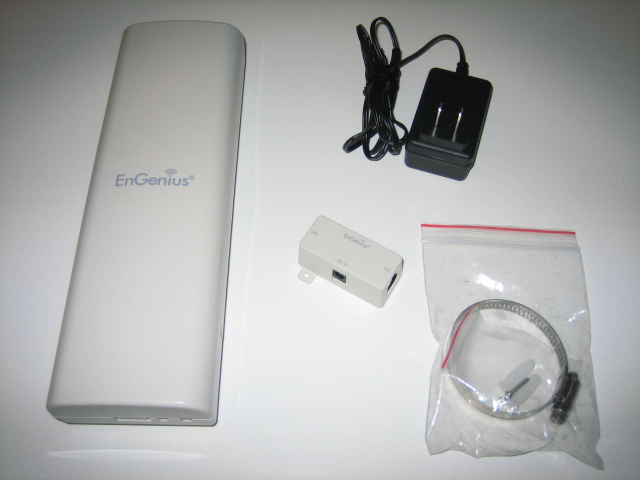
Engenius EOC-2610

 
I have already sold more than 30 units engenius EOC-2610 model and was surprised by the performance of this model. I test this model has so far 2 KM + with LOS (Line Of Sight) to get 2 bars signal. when used with a USB adapter 1000mw will get 3 or 4 bar signal. however, the internal antenna is not the type of antenna that is able to resist the winds of considerable strength. to get the signal strength should be used with external antenna type from HIGH GAIN ANTENNA.Feedback received indicated satisfaction towards this model as well as the 1000mw usb adapter.


Mysql Dump Script ( Updated )

Here is the updated mysql dump script to share that i use on 5 years old servers ( with no downtime ) as a network backup server

#!/bin/bash

##### SETTING #####
MYUSER="root"
MYPWD="******"
DB="mysql **** **** ****"
DIR=$(date +%Y)/$(date +%B)
FAIL=backup_$(date +%d-%m-%Y)
HOST="mysql-local-server"

###################

cd /tmp

##check, repair and optimize before backup
mysqlcheck --auto-repair -m -o -B $DB -u $MYUSER -p$MYPWD -h $HOST
 ##backup now

mysqldump -c -x --add-drop-table --add-locks --database $DB -u $MYUSER -p$MYPWD -h $HOST > $FAIL.sql
if test -d "/home/data-backup/$DIR"
then
        tar -jcf /home/data-backup/$DIR/$FAIL.tgz $FAIL.sql
        #zip -9 -o /home/data-backup/$DIR/$FAIL.zip $FAIL.sql
        #rar -a m5 /home/data-backup/$DIR/$FAIL.rar $FAIL.sql
        rm -f /home/data-backup/latest.tgz
        ln -s /home/data-backup/$DIR/$FAIL.tgz /home/data-backup/latest.tgz
 

# secondary backup to ftp server
#       /skrip/ftpbackend
else
        mkdir -p /home/data-backup/$DIR
        tar -jcf /home/data-backup/$DIR/$FAIL.tgz $FAIL.sql
        rm -f /home/data-backup/latest.tgz
        ln -s /home/data-backup/$DIR/$FAIL.tgz /home/data-backup/latest.tgz


#secondary backup to ftp server
#       /skrip/ftpbackend
fi
rm -f $FAIL

Monday, September 27, 2010

Free up your memory on linux

this script does help me much on my linux :


------ cut ---------------


#!/bin/sh
sync; echo 3 > /proc/sys/vm/drop_caches


-------------------------


then chmod 755 the script.. test first before put it in cron


#free -m  ( to check before and after running the script )


this cron will run once on every 30 minutes


*/30 * * * * path-to-your-script

 Simple Python Calculator This script will allows your to calculate the integers given with the chosen operation. You can add, substract, mu...