just browsing the web and find useful network admin tool in organization.. got to try this.. but... based on windows :-(
http://www.spiceworks.com
and the great site here
Monday, December 20, 2010

Saturday, December 18, 2010
Open Source Point Of Sale
just found this LEMONPOS
and great option to touch screen pos for restaurant http://floreantpos.com
"Lemon is an open source point of sale for linux and other unix systems. It is targeted for the small and medium sized business, and has been conceived for ease of use and customization.
It allows to change the look by editing a CSS file and making personalized images. This, to provide a modern good-looking interface to impact the user and the client that looks at it.
It is considered a general point of sale, not focused to a specific sector. It can be used at a general store, a fast-food restaurant or a book store."
and great option to touch screen pos for restaurant http://floreantpos.com
Sunday, November 21, 2010
Vmware-authd not running
Problem: You install VMware Server and try to connect with the VMware Server Console but get "Connection refused."
Solution: vmware wants to run 'vmware-authd' from xinetd. You must install xinetd and put the following file in /etc/xinetd.d/vmware-authd:
# default: on
# description: The VMware remote access authentification daemon
service vmware-authd
{
disable = no
port = 902
socket_type = stream
protocol = tcp
wait = no
user = root
server = /usr/sbin/vmware-authd
type = unlisted
}
Solution: vmware wants to run 'vmware-authd' from xinetd. You must install xinetd and put the following file in /etc/xinetd.d/vmware-authd:
# default: on
# description: The VMware remote access authentification daemon
service vmware-authd
{
disable = no
port = 902
socket_type = stream
protocol = tcp
wait = no
user = root
server = /usr/sbin/vmware-authd
type = unlisted
}
Saturday, November 13, 2010
Routing : Add different subnet using ip route
i found this useful note but can't remember where.. hope this help
|xxxxxxx][===================>
Last time I tried to add a network which is outside of my subnet and I got errors something like as follows;
# ip route add default via 100.100.100.100 dev eth0
RTNETLINK answers: Network is unreachable
# route add default gw 100.100.100.100 dev eth0
RTNETLINK answers: Network is unreachable
This error just indicates that ip “100.100.100.100″ is not reachable from my PC since the PC has got one interface with ip 10.10.10.1. Even network babies know that 100.100.100.100 is not pingable from 10.10.10.1
In very rare cases I have seen some ISPs give gateway address which does not fall in the assigned subnet, so what to do in this case?!.. interestingly windows machines do not give any errors while setting this type of gateways.
So the solution is to use “onlink” option with “ip route” command
# ip route add default via 100.100.100.100 dev eth0 onlink
When you use “onlink” option it just assume that the gateway/nexthop is directly attached to the link. Done
|xxxxxxx][===================>
Last time I tried to add a network which is outside of my subnet and I got errors something like as follows;
# ip route add default via 100.100.100.100 dev eth0
RTNETLINK answers: Network is unreachable
# route add default gw 100.100.100.100 dev eth0
RTNETLINK answers: Network is unreachable
This error just indicates that ip “100.100.100.100″ is not reachable from my PC since the PC has got one interface with ip 10.10.10.1. Even network babies know that 100.100.100.100 is not pingable from 10.10.10.1
In very rare cases I have seen some ISPs give gateway address which does not fall in the assigned subnet, so what to do in this case?!.. interestingly windows machines do not give any errors while setting this type of gateways.
So the solution is to use “onlink” option with “ip route” command
# ip route add default via 100.100.100.100 dev eth0 onlink
When you use “onlink” option it just assume that the gateway/nexthop is directly attached to the link. Done
Wednesday, September 29, 2010
DHCPD On Multiple Interface
I have eth0 192.168.0.1 and eth2 192.168.98.1 and here is my simplified dhcpd.conf:
# dhcpd.conf
#
# Configuration file for ISC dhcpd (see 'man dhcpd.conf')
#
default-lease-time 2400;
max-lease-time 7200;
option domain-name "mydomain.com";
ddns-update-style none;
subnet 192.168.0.0 netmask 255.255.255.0 {
option subnet-mask 255.255.255.0;
option broadcast-address 192.168.0.255;
option routers 192.168.0.1;
range 192.168.0.51 192.168.0.249;
}
subnet 192.168.98.0 netmask 255.255.255.0 {
option subnet-mask 255.255.255.0;
option broadcast-address 192.168.98.255;
option routers 192.168.98.1;
range 192.168.98.51 192.168.98.249;
}
and DHCP starts in my startup script:
# dhcpd.conf
#
# Configuration file for ISC dhcpd (see 'man dhcpd.conf')
#
default-lease-time 2400;
max-lease-time 7200;
option domain-name "mydomain.com";
ddns-update-style none;
subnet 192.168.0.0 netmask 255.255.255.0 {
option subnet-mask 255.255.255.0;
option broadcast-address 192.168.0.255;
option routers 192.168.0.1;
range 192.168.0.51 192.168.0.249;
}
subnet 192.168.98.0 netmask 255.255.255.0 {
option subnet-mask 255.255.255.0;
option broadcast-address 192.168.98.255;
option routers 192.168.98.1;
range 192.168.98.51 192.168.98.249;
}
and DHCP starts in my startup script:
Code:
/usr/sbin/dhcpd eth0 eth2 Vlan on Debian : Another Tutorial
Here is a quick guide how to enable VLANs on Ubuntu or Debian box.
VLANs on Linux will work with the most of the modern ethernet adapters. Frankly speaking I have not came across of adapter it would not work with.
I presume that you use standard kernel shipped with Ubuntu. However, if you use a custom built kernel make sure VLAN support is enabled in it.
In this example I want my computer to connect to vlan4,vlan5 and vlan101. My default gateway is in vlan101. And I have only one ethernet interface eth0.
Note: If you want to connect to only one VLAN or you have many network interfaces it is possible to do as well.
OK, now how to do this:
1. Install VLAN package on your computer:
Note: You have to replace my IP addresses, network masks and gateway IP address with your own.
3. Make sure that switch interface you are connected to configured with respective VLANs.
4. Restart your network interface:
You should see something like:
And this is it. Nice and easy. Happy VLANing!
VLANs on Linux will work with the most of the modern ethernet adapters. Frankly speaking I have not came across of adapter it would not work with.
I presume that you use standard kernel shipped with Ubuntu. However, if you use a custom built kernel make sure VLAN support is enabled in it.
In this example I want my computer to connect to vlan4,vlan5 and vlan101. My default gateway is in vlan101. And I have only one ethernet interface eth0.
Note: If you want to connect to only one VLAN or you have many network interfaces it is possible to do as well.
OK, now how to do this:
1. Install VLAN package on your computer:
sudo apt-get install vlan
# The loopback network interface

auto lo

iface lo inet loopback
# This is a list of hotpluggable network interfaces.
# They will be activated automatically by the hotplug subsystem.
auto vlan4
auto vlan5
auto vlan101# VLAN 4
iface vlan4 inet static
address 192.168.0.8
netmask 255.255.255.192
network 192.168.0.0
broadcast 192.168.0.63
mtu 1500
vlan_raw_device eth0# VLAN 5
iface vlan5 inet static
address 10.0.111.8
netmask 255.255.255.0
network 10.0.111.0
broadcast 10.0.111.255
mtu 1500
vlan_raw_device eth0# VLAN 101
iface vlan101 inet static
address 172.12.101.8
netmask 255.255.255.0
network 172.12.101.0
broadcast 172.12.101.255
gateway 172.12.101.1
mtu 1500
vlan_raw_device eth0Note: You have to replace my IP addresses, network masks and gateway IP address with your own.
3. Make sure that switch interface you are connected to configured with respective VLANs.
4. Restart your network interface:
sudo /etc/init.d/networking restart You should see something like:
Set name-type for VLAN subsystem. Should be visible in /proc/net/vlan/config

Added VLAN with VID == 4 to IF -:eth0:-

Set name-type for VLAN subsystem. Should be visible in /proc/net/vlan/config

Added VLAN with VID == 5 to IF -:eth0:-

Set name-type for VLAN subsystem. Should be visible in /proc/net/vlan/config

Added VLAN with VID == 101 to IF -:eth0:-
And this is it. Nice and easy. Happy VLANing!
Vlan On Debian
Suppose you have a layer 2 switch with support for 802.1q, and want to route traffic from one VLAN to another VLAN you can use a linux box for that.
VLAN is Virtual Lan and it is created with equipments such as switches that support the 802.1q protocol, which manage to insert a 'tag' in the ethernet frame, this tag identifies the VLAN to which a packet belongs.
If you have two VLANs in a switch is like having physically two switches, as the packets from one does not pass to the other, if you need to pass traffic from one to another VLAN you will a layer 3 switch, and enable the internal virtual router, but you can do that with a Linux Box, this way.
-- this is to install the vlan software --
-- This is to load the 802.1q module --
-- Creating two vlans over the eth0 interface --
-- To make only the VLAN interfaces to have traffic, be sure you have the eth0 up or you will see no traffic at all --
-- Asume you have this two VLANs 1 is 10.1.1.0/24 and the second is 10.1.2.0/24 and you want traffic between them --
Now you have this done, configure your one of your switch ports to belong to VLAN 2 and 3 at the same time, and connect your linux box to that port.
-- To enable packet forwarding on the linux router --
That should be all.
If you want to see what is happening you can use Ethereal on your linux and will get a graphic like this
http://www.go2linux.org/pics/single_pictures/Screenshot-vlan.png
Note: From http://www.go2linux.org/vlan-with-debian
****haha..previously i've done this with SID but in Malay.. it really helps and working http://blog.mynux.net/2008/06/debian-lennysid-dan-vlans-cara-aku.html... please take a look there
VLAN is Virtual Lan and it is created with equipments such as switches that support the 802.1q protocol, which manage to insert a 'tag' in the ethernet frame, this tag identifies the VLAN to which a packet belongs.
If you have two VLANs in a switch is like having physically two switches, as the packets from one does not pass to the other, if you need to pass traffic from one to another VLAN you will a layer 3 switch, and enable the internal virtual router, but you can do that with a Linux Box, this way.
apt-get install vlan
-- this is to install the vlan software --
modprobe 8021q
-- This is to load the 802.1q module --
vconfig add eth0 2
vconfig add eth0 3
-- Creating two vlans over the eth0 interface --
ifconfig eth0 0.0.0.0 up
-- To make only the VLAN interfaces to have traffic, be sure you have the eth0 up or you will see no traffic at all --
ifconfig eth0.2 10.1.1.1 broadcast 10.1.1.255 netmask 255.255.255.0 up
ifconfig eth0.3 10.1.2.1 broadcast 10.1.2.255 netmask 255.255.255.0 up
-- Asume you have this two VLANs 1 is 10.1.1.0/24 and the second is 10.1.2.0/24 and you want traffic between them --
Now you have this done, configure your one of your switch ports to belong to VLAN 2 and 3 at the same time, and connect your linux box to that port.
echo 1 > /proc/sys/net/ipv4/ip_forward
-- To enable packet forwarding on the linux router --
route add -net 10.1.1.0 netmask 255.255.255.0 gw eth0.2
route add -net 10.1.2.0 netmask 255.255.255.0 gw eth0.3
That should be all.
If you want to see what is happening you can use Ethereal on your linux and will get a graphic like this
http://www.go2linux.org/pics/single_pictures/Screenshot-vlan.png

Note: From http://www.go2linux.org/vlan-with-debian
****haha..previously i've done this with SID but in Malay.. it really helps and working http://blog.mynux.net/2008/06/debian-lennysid-dan-vlans-cara-aku.html... please take a look there
Engenius EOC-2610
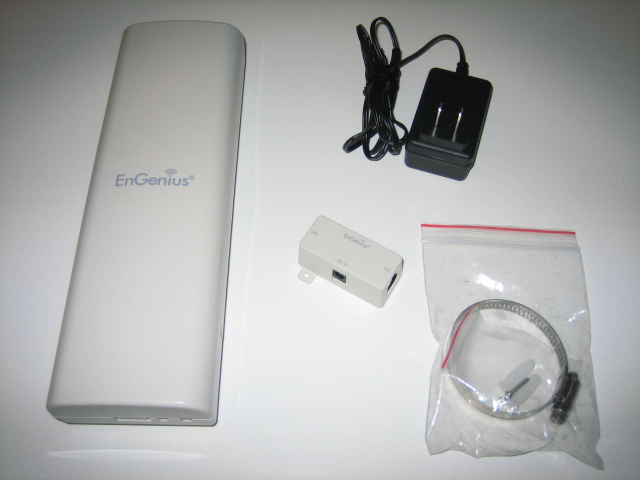
I have already sold more than 30 units engenius EOC-2610 model and was surprised by the performance of this model. I test this model has so far 2 KM + with LOS (Line Of Sight) to get 2 bars signal. when used with a USB adapter 1000mw will get 3 or 4 bar signal. however, the internal antenna is not the type of antenna that is able to resist the winds of considerable strength. to get the signal strength should be used with external antenna type from HIGH GAIN ANTENNA.Feedback received indicated satisfaction towards this model as well as the 1000mw usb adapter.
Mysql Dump Script ( Updated )
Here is the updated mysql dump script to share that i use on 5 years old servers ( with no downtime ) as a network backup server
#!/bin/bash
##### SETTING #####
MYUSER="root"
MYPWD="******"
DB="mysql **** **** ****"
DIR=$(date +%Y)/$(date +%B)
FAIL=backup_$(date +%d-%m-%Y)
HOST="mysql-local-server"
###################
cd /tmp
##check, repair and optimize before backup
mysqlcheck --auto-repair -m -o -B $DB -u $MYUSER -p$MYPWD -h $HOST
##backup now
mysqldump -c -x --add-drop-table --add-locks --database $DB -u $MYUSER -p$MYPWD -h $HOST > $FAIL.sql
if test -d "/home/data-backup/$DIR"
then
tar -jcf /home/data-backup/$DIR/$FAIL.tgz $FAIL.sql
#zip -9 -o /home/data-backup/$DIR/$FAIL.zip $FAIL.sql
#rar -a m5 /home/data-backup/$DIR/$FAIL.rar $FAIL.sql
rm -f /home/data-backup/latest.tgz
ln -s /home/data-backup/$DIR/$FAIL.tgz /home/data-backup/latest.tgz
# secondary backup to ftp server
# /skrip/ftpbackend
else
mkdir -p /home/data-backup/$DIR
tar -jcf /home/data-backup/$DIR/$FAIL.tgz $FAIL.sql
rm -f /home/data-backup/latest.tgz
ln -s /home/data-backup/$DIR/$FAIL.tgz /home/data-backup/latest.tgz
#secondary backup to ftp server
# /skrip/ftpbackend
fi
rm -f $FAIL
#!/bin/bash
##### SETTING #####
MYUSER="root"
MYPWD="******"
DB="mysql **** **** ****"
DIR=$(date +%Y)/$(date +%B)
FAIL=backup_$(date +%d-%m-%Y)
HOST="mysql-local-server"
###################
cd /tmp
##check, repair and optimize before backup
mysqlcheck --auto-repair -m -o -B $DB -u $MYUSER -p$MYPWD -h $HOST
##backup now
mysqldump -c -x --add-drop-table --add-locks --database $DB -u $MYUSER -p$MYPWD -h $HOST > $FAIL.sql
if test -d "/home/data-backup/$DIR"
then
tar -jcf /home/data-backup/$DIR/$FAIL.tgz $FAIL.sql
#zip -9 -o /home/data-backup/$DIR/$FAIL.zip $FAIL.sql
#rar -a m5 /home/data-backup/$DIR/$FAIL.rar $FAIL.sql
rm -f /home/data-backup/latest.tgz
ln -s /home/data-backup/$DIR/$FAIL.tgz /home/data-backup/latest.tgz
# secondary backup to ftp server
# /skrip/ftpbackend
else
mkdir -p /home/data-backup/$DIR
tar -jcf /home/data-backup/$DIR/$FAIL.tgz $FAIL.sql
rm -f /home/data-backup/latest.tgz
ln -s /home/data-backup/$DIR/$FAIL.tgz /home/data-backup/latest.tgz
#secondary backup to ftp server
# /skrip/ftpbackend
fi
rm -f $FAIL
Monday, September 27, 2010
Free up your memory on linux
this script does help me much on my linux :
------ cut ---------------
#!/bin/sh
sync; echo 3 > /proc/sys/vm/drop_caches
-------------------------
then chmod 755 the script.. test first before put it in cron
#free -m ( to check before and after running the script )
this cron will run once on every 30 minutes
*/30 * * * * path-to-your-script
------ cut ---------------
#!/bin/sh
sync; echo 3 > /proc/sys/vm/drop_caches
-------------------------
then chmod 755 the script.. test first before put it in cron
#free -m ( to check before and after running the script )
this cron will run once on every 30 minutes
*/30 * * * * path-to-your-script
Thursday, July 22, 2010
RTL 8187 over Solaris / Opensolaris 10
To install the 1000mW usb wireless adapter ( can purchase from me :P ) over Solaris 10 here i wrote the step to go
package without having to reboot first:
If plumbing failed, your card may be not supported or just not
getting properly identified by the Solaris kernel.
If you can plumb the urtw0 interface, you can use wificonfig/dladm CLI to config the wifi.
Alternatively, you can enable the GUI nwam.
Easy... but not too easy for new comers for unix/linux operating system..but a good step to experience
# wget http://www.opensolaris.org/os/community
/laptop/downloads/SUNWurtw-0.2.tar.gz
# gzip -dc SUNWurtw-0.2.tar.gz | tar xvf -
# pkgadd -d . SUNWurtw
You should be able to plumb the interface right after installing this
package without having to reboot first:
# ifconfig urtw0 plumb
If plumbing failed, your card may be not supported or just not
getting properly identified by the Solaris kernel.
If you can plumb the urtw0 interface, you can use wificonfig/dladm CLI to config the wifi.
Alternatively, you can enable the GUI nwam.
Easy... but not too easy for new comers for unix/linux operating system..but a good step to experience
Wednesday, July 21, 2010
What is the best operating system and why?
Source from : http://wiki.answers.com
Note: Both Mac OS X and Windows have come out with newer versions as of the writing of this answer. Some details may be different from what is written below, and the answer should be updated accordingly
The best desktop operating system to use depends on what its intended use will be and who will be using it. There is no specific operating system which can be called "the best" overall, and since most current operating systems share most common and advanced features there is much debate on the topic. A few of the most popular operating system, their pros and cons, and some of their best uses are described below.
Microsoft Windows
Pros:- The largest library of programs and applications.
- Some commercial games work only with Windows and DirectX.
- Almost all hardware has drivers which are compatible with Windows.
- Most widely used.
Cons:
- Prone to viruses, spyware, and adware if proper steps not taken such as installation of internet security software, which reduces performance speed.
- Requires regular maintenance to avoid system errors and reduced performance.
- Even with maintenance, issues can slowly accumulate requiring a re-installation of Windows to restore performance and fix software issues.
- Purchasing a Windows license/install disk can be relatively expensive
- Windows Vista, the most recent version of Windows, has high system requirements.
Notes:
- Windows Vista has relatively high system requirements compared to its Windows XP and other operating systems. This has caused many individuals and businesses to continue using the older Windows XP.
- The two most common versions of Windows are Windows XP and Windows Vista. Vista, although it has some issues, does have some new features such as search-as-you-type search and a 3D-accelerated desktop, features up until now only found in Mac OS X and some versions of Linux.
- With the introduction of Virtual-machine software, Windows has become a popular add-on for Mac and Linux in order allow those computers to support Windows-only software or hardware when needed.
- The Windows market share has seen some decrease in recent years and months.
Best uses:
- Gamers
- People who must use Windows-only software for work or school.
- People or businesses looking for an inexpensive computer yet do not have the ability to use Linux.
Mac OS X
Pros:- Relatively simple and intuitive interface with many advanced features.
- Not virus or malware prone, generally: there are no Mac OS X viruses in the wild, and with its UNIX base, it is fairly resilient. There are a small number of trojans (malicious software) which have been known to take effect through applications running in Mac OS X, though they are almost always found on illegal-content-based websites and are not of significant concern. Apple has begun integrating malware blacklists into Mac OS X to prevent infection.
- Second-largest selection of software, with many high-quality Mac-only programs in existence, such as those found in iLife. Although at one point software for certain tasks were not Mac-compatible, all software is now either Mac-compatible or has an equivalent that is. Most advanced games have also recently became compatible with Mac OS X.
- Reliable and high performance.
Cons:
- Limited to Apple-manufactured hardware.
- Some hardware does not have Mac-compatible drivers, though the number of this hardware has recently become small and negligible.
- In some cases, it may be difficult to do cross-platform network hardware sharing for a Mac OS X based computer in a Windows network or visa-versa. For example, a printer's Mac driver may not support cross-platform printing to a Windows-connected printer, and replacement drivers may or may not exist.
- Smaller library of applications in comparison to Windows.
Notes:
- Macs occupy the medium-range to high-end computer market and as such are not sold for the same prices of some low-end PC brands (e.g. the low-end Mac Mini costs $600 USD yet many mainstream low-end PC brand desktops can be purchased for around $400-500). As a result, Macs are popularly considered to be more expensive than PCs, however Macs have been shown to have competitive pricing to comparable PCs (e.g. the Lenovo Thinpad X300 costs about $2,500 while the MacBook Air runs between $1,800 and $2,700 and outperforms the Thinkpad, or the Dell XPS One prices at about $150 higher than a comparable iMac. Additionally, the following factors can cause the total price of owning a Mac to be even less compared than that of a PC: Apple iWork is relatively inexpensive compared to Microsoft Office, PCs experience hardware or software failures more frequently than Macs, increasing service and replacement costs, Macs do not require the frequently expensive internet security software subscriptions.
- Though Mac OS X suffers from relatively very few real-world hacks, security holes in Mac OS X do exist, just like in any other operating system. Also like in other operating systems, they are fixed with software updates upon their discovery.
- With a relatively low market share compared to Windows, there are still individual programs which are only Windows compatible. However, virtual machine software with a Windows installation or compatibility layer software can allow those programs to run even on a Mac.
- The Mac has seen significant market share increases in recent years and months, something which has also increased the amount of Mac-compatible software.
Best uses:
- Students who are not required to use Windows-specific software (though Windows can easily be installed to use Windows software). A recent study indicated that the number of American students intending to purchase Macs has neared that of Windows-based PCs.
- Home users looking for an easy and reliable computing experience who are willing to pay more than low-end PC prices.
- Graphic designers and photographers.
- Scientists.
Linux and other UNIX-based
Pros:- Low number of viruses and other malware, similar to Mac OS X
- Usually free
- Large selection of Linux distributions to choose from.
- Has a large amount of free and open source software equivalents to commercial Windows and Mac software
- More easily customizable
- Can run many Windows programs with the use of a compatibility layer such as Wine. (Programs such as Cedega can be used to run many Windows games)
- Reliable with good performance and low requirements.
Cons:
- Advanced use and installation of some software may require more advanced knowledge than is required for use of Windows and Mac.
- Many commercial programs do not support Linux
- Small commercial game library
Notes:
- There are a few main types of Linux: Debian, Fedora, Red Hat, and SUSE. Ubuntu, a type of Debian, is highly popular among home users, as is SUSE, to a lesser extent. Fedora is more popular among businesses.
- There are many other (non-Linux) UNIX-based operating systems (with the same UNIX base as Linux), including Mac OS X and SunOS (which are based on Free-BSD). There are also some UNIX-like operating systems.
- Through customization and software like Beryl, Linux can be made to have advanced desktop effects similar to Aero on Windows Vista or Aqua on Mac OS X.
- "Dependency hell" can make installation of certain programs on Linux difficult even for advanced users.
Best uses:
- Experienced computer users looking for a good, free operating system.
- Businesses looking for reliable and affordable computing, so long as they do not need Windows-only software and have a competent IT manager.
Bottom line
Though there is no one clear best operating system, each does have its advantages and disadvantages, and different people will be best using different ones. Microsoft Windows is the most common operating system and is a reasonable choice for most people. Mac OS X is second-most popular (and gaining market share) and is an excellent operating system for those who can purchase a Mac. Linux is a very good advanced operating system available for free and is recommended for experienced users.Mobile Operating Systems
Aside from the main question of which OS to use in your home or work computer, lightweight mobile operating systems are also used (and almost always pre-installed or even hard-wired) in mobile devices such as cell phones, smartphones, PDAs, and Internet Notebooks/Superportables (which are similar to downsized laptops with low specifications). There is not a great deal of choice among these, and features differences are based more on the mobile device itself, and less on the operating system. Windows Mobile is usually used in Pocket PCs and Smartphones; iPhone OS (based on Mac OS X) is used in the Apple iPhone and iPod Touch; Symbian is used in Nokia, Sony-Ericsson, and other cell phones; and Linux-based mobile OSes are common both on cell phones and small Internet Notebooks.Note: There are comments associated with this question. See the discussion page to add to the conversation.
Monday, July 12, 2010
Bind9 Error : named[8660]: network unreachable resolving ...
got this error today from syslog...
named[8660]: network unreachable resolving 'zd.akadns.org/AAAA/IN': 2001:500:f::1#53
RESOLVED
edit /etc/default/bind9 and key in -4 ( for ipv4 listening only ) to OPTIONS
OPTIONS="-4 -u named"
then restart bind
named[8660]: network unreachable resolving 'zd.akadns.org/AAAA/IN': 2001:500:f::1#53
RESOLVED
edit /etc/default/bind9 and key in -4 ( for ipv4 listening only ) to OPTIONS
OPTIONS="-4 -u named"
then restart bind
Monday, May 10, 2010
MS Excel : Right mouse disabled?
when dealing with macro from any MS Access or Excel, i found that sometime it will disable right mouse click on sheet in MS Excel. I did not know what's going on but it really give me a headache. Searching around the google and found this solutions :-
Open Excel
Press ALT+F11 to open visual basic editor
Go to View -- Immediate Window and paste this command then press enter
Application.CommandBars("Cell").enabled = true
next try to right click on sheet.. it works for me..
another option :-
On Error Resume Next
Application.CommandBars(”Worksheet Menu Bar”).Enabled = True
Application.CommandBars(”Standard”).Enabled = True
Application.CommandBars(”Standard”).Enabled = True
Application.CommandBars(”Cell”).Enabled = True
Application.DisplayFormulaBar = True
Application.DisplayStatusBar = True
Application.CommandBars(”Toolbar List”).Enabled = True
Application.DisplayFormulaBar = True
ActiveWindow.DisplayHeadings = True
Application.DisplayStatusBar = True
ActiveWindow.DisplayHorizontalScrollBar = True
ActiveWindow.DisplayVerticalScrollBar = True
ActiveWindow.DisplayWorkbookTabs = True
Application.CommandBars(”Standard”).Visible = True
Application.CommandBars(”Formatting”).Enabled = True
Application.CommandBars(”Formatting”).Visible = True
Application.CommandBars(”Chart”).Enabled = True
Application.CommandBars(”Forms”).Enabled = True
Application.CommandBars(”Web”).Enabled = True
Application.CommandBars(”Reviewing”).Enabled = True
Application.CommandBars(”Visual Basic”).Enabled = True
Application.CommandBars(”Drawing”).Enabled = True
Application.CommandBars(”web”).Enabled = True
Application.CommandBars(”Picture”).Enabled = True
Application.CommandBars(”PivotTable”).Enabled = True
Application.CommandBars(”CELL”).Enabled = True
Application.CommandBars(”Visual Basic”).Enabled = True
another option :-
On Error Resume Next
Application.CommandBars(”Worksheet Menu Bar”).Enabled = True
Application.CommandBars(”Standard”).Enabled = True
Application.CommandBars(”Standard”).Enabled = True
Application.CommandBars(”Cell”).Enabled = True
Application.DisplayFormulaBar = True
Application.DisplayStatusBar = True
Application.CommandBars(”Toolbar List”).Enabled = True
Application.DisplayFormulaBar = True
ActiveWindow.DisplayHeadings = True
Application.DisplayStatusBar = True
ActiveWindow.DisplayHorizontalScrollBar = True
ActiveWindow.DisplayVerticalScrollBar = True
ActiveWindow.DisplayWorkbookTabs = True
Application.CommandBars(”Standard”).Visible = True
Application.CommandBars(”Formatting”).Enabled = True
Application.CommandBars(”Formatting”).Visible = True
Application.CommandBars(”Chart”).Enabled = True
Application.CommandBars(”Forms”).Enabled = True
Application.CommandBars(”Web”).Enabled = True
Application.CommandBars(”Reviewing”).Enabled = True
Application.CommandBars(”Visual Basic”).Enabled = True
Application.CommandBars(”Drawing”).Enabled = True
Application.CommandBars(”web”).Enabled = True
Application.CommandBars(”Picture”).Enabled = True
Application.CommandBars(”PivotTable”).Enabled = True
Application.CommandBars(”CELL”).Enabled = True
Application.CommandBars(”Visual Basic”).Enabled = True
Wednesday, March 31, 2010
Regedit for Gnome?
We're familiar with regedit.exe in windows operation system but we didn't know ( as a newbie ) that GNOME got their own configuration tools. I'm using LinuxMint right now but it should works for all GNOME on all unix/linux OS..
open up your terminal then type in this command
#gconf-editor
then enter ... hahaha.. stupid thing for expert but a new knowledge for a newbie like me..
open up your terminal then type in this command
#gconf-editor
then enter ... hahaha.. stupid thing for expert but a new knowledge for a newbie like me..
Subscribe to:
Comments (Atom)